On this page
A deposit is money the customer pays when they approve a quote. Rollout takes it off the invoice later.
To take deposits online, connect Stripe first.
Set your default deposit
- On the web, go to Settings > Financial.
- Under Quote Deposits, turn on Require Deposit on Approval.
- For Deposit Type, choose Percentage or Fixed Amount, and enter the amount. A fixed amount is capped at the quote total.
New leads and quotes get your default when you create them. If you change the default later, quotes you already made keep the deposit they have.
Jobs you book straight onto the schedule don't get a deposit.
Change the deposit on one job
Owners and admins change one job's deposit in the iPhone app:
- Open the job and go to the Quote tab.
- Tap the deposit row. On a quote with no deposit, it reads No deposit · Add.
- Choose None, Percent, or Amount, then tap the save button.
If you already sent the quote, the quote link shows the new deposit. Rollout doesn't email the customer again unless you send the quote again.
After the customer approves the quote, the deposit can't change.
When the customer pays
- From the quote link
- The customer signs, then pays the deposit online. Paying approves the quote.
- When they sign on your phone
- After they approve, owners and admins see Collect deposit on the job. Tap it to take the payment now, or tap Later to start work and collect it afterward. Until the deposit is paid or someone taps Later, you can't start the timer on that job.
To take the deposit on the phone, see Collect payment on the phone.
How a deposit comes off the invoice
When you create an invoice for the job, Rollout applies the paid deposit to the draft. The invoice, its PDF, and its email show it as Deposit received.
Once you send the invoice, the deposit on it stays fixed. If you void or delete the invoice, the deposit goes back to the job for the next invoice.
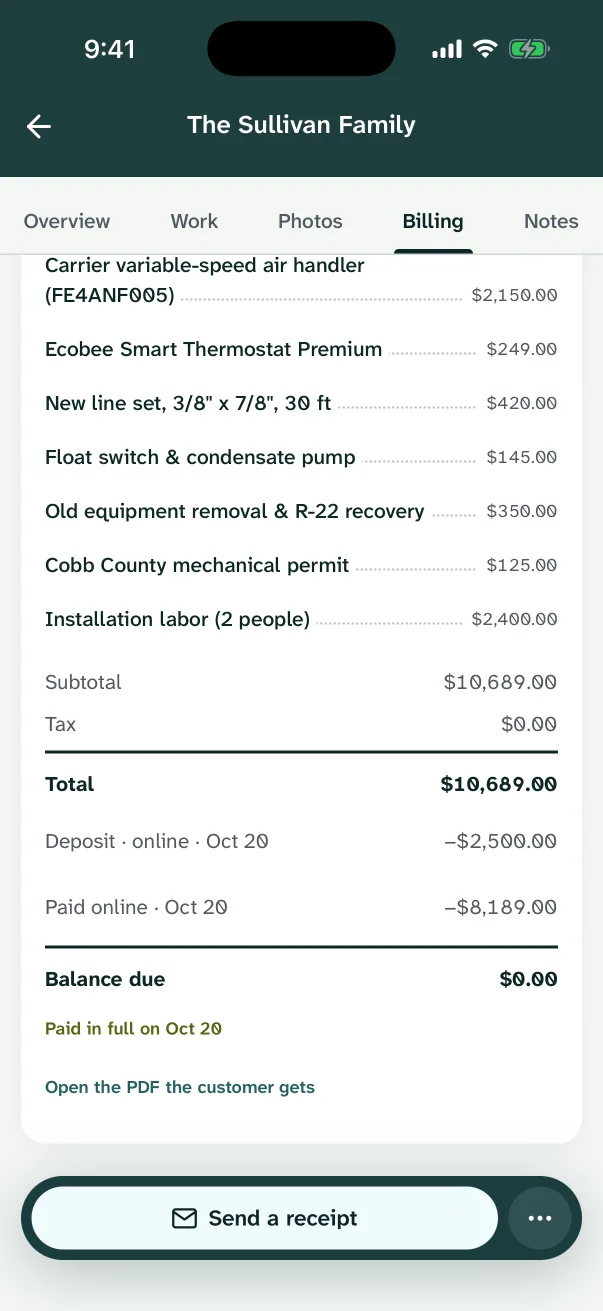
The Billing tab after the customer paid: the deposit and the final payment come off the total.
If you cancel a job
Cancelling a job doesn't refund a deposit. Rollout warns you on the web before you cancel a job that has payments.