Hours land on the job, ready to bill
The timer starts on arrival. On hourly jobs, the hours go on the invoice at each person’s rate.
Tired of fixing timesheets? When your team arrives at a job, Rollout starts their timer. When they leave, it asks if they’re done, so a parts run doesn’t end the job.
Scheduling, quotes, and invoices for your business, with a timer that starts itself.
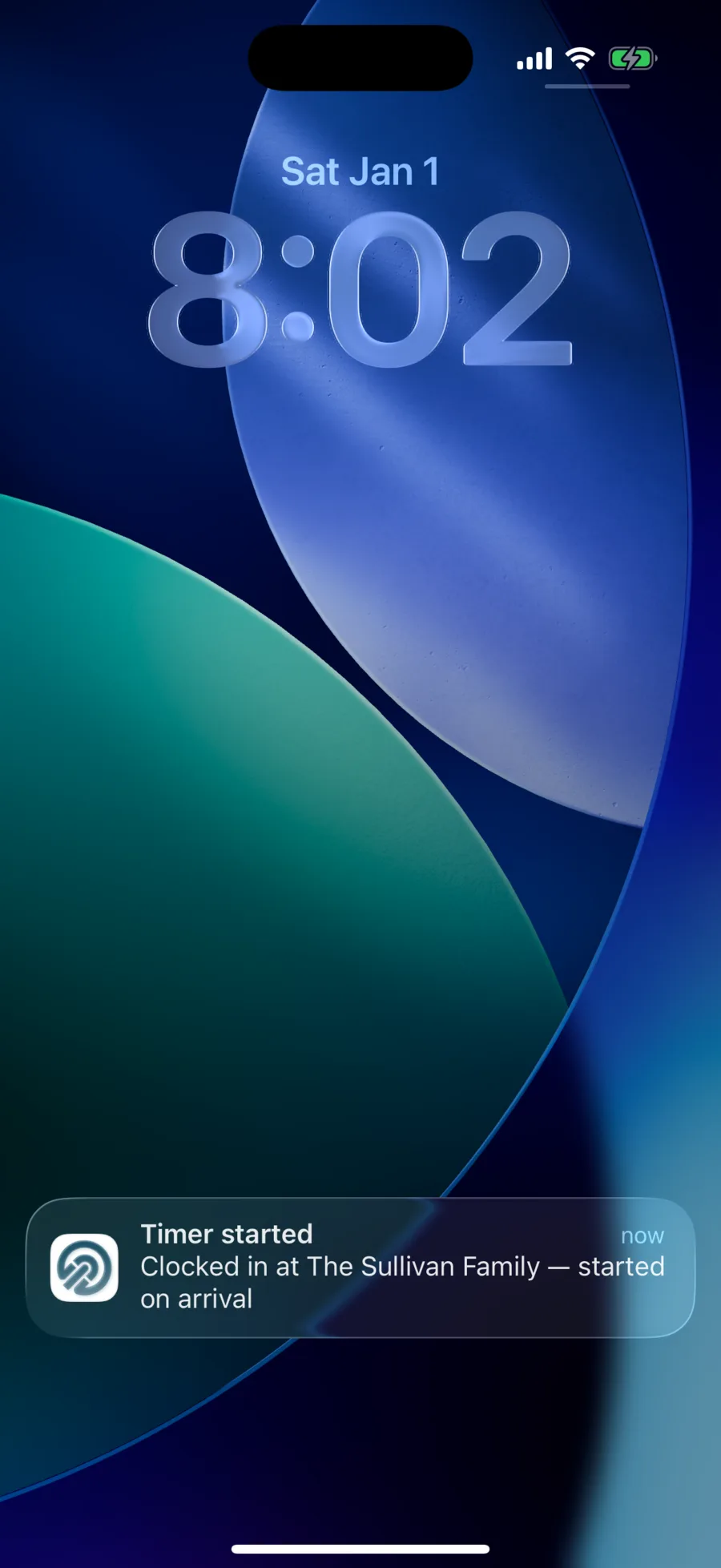
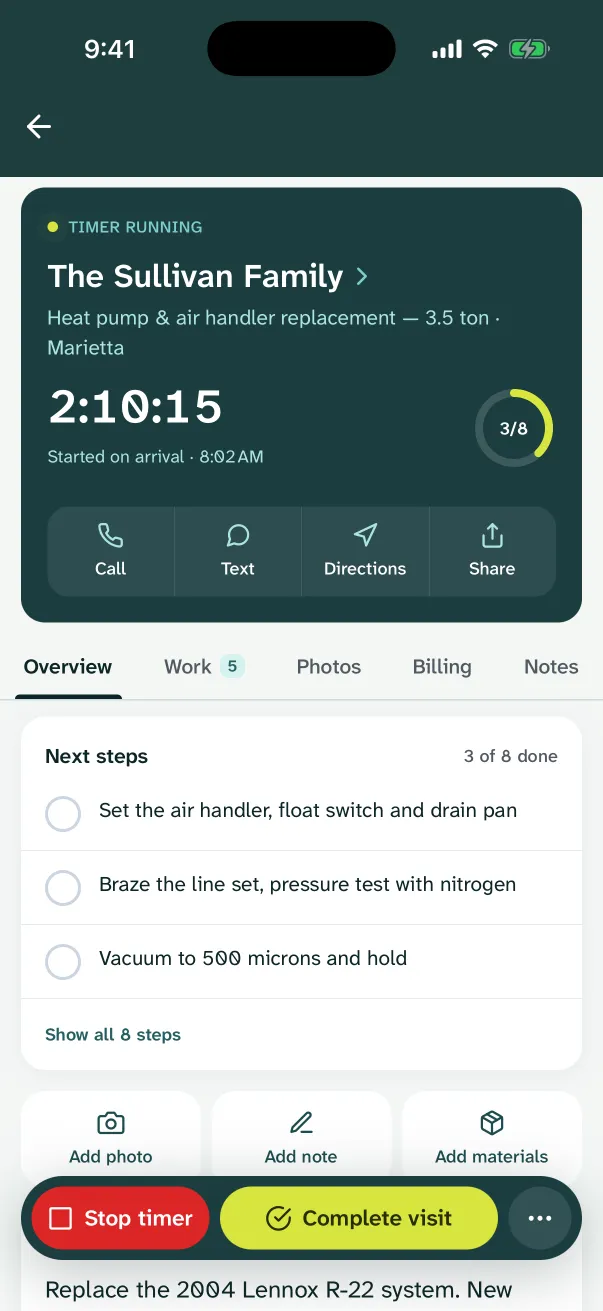
Leave for parts? Your timer asks before it stops.
A time clock no one has to remember to start. At a job with a visit for that person today, the timer starts on arrival. At any other open job, Rollout asks first.
Arrive
The timer starts
The first arrival at a job each day starts the timer. The team member gets a Timer started notification with View job and Stop timer.
Come back
It asks first
Back at the same job later that day? Rollout asks before it starts another timer. Tap Start timer or Dismiss.
Leave
It asks if you’re done
A few minutes after you leave, Rollout asks Your timer is still running. Stop it? Tap Stop timer, or Keep running if it’s just a parts run.
Every start and stop saves to the job and the timesheet
Each person’s hours show on the job and on their own timesheet. On hourly jobs, those hours go on the invoice at each person’s rate.
Owners and admins see the week by person and by job, and fix an entry when someone forgot. Want to sign off before payroll? Turn on timesheet approval. About timesheets
Try it on your next job, free for 14 daysThe arrival timer is on every plan
You only pay for people. Solo is $39 a month for 1 person. Team is $79 a month for up to 5 people. Jobber puts location timers on its Grow plan: $299 a month for 5 people.
Rollout Team
Up to 5 people, then $19 a month for each extra person
Solo: $39 a month for 1 person, with the same features
Try Solo free- Automatic clock-in
- Timesheets
- Scheduling and map view
- Quotes and invoices
- Online payment links
- iPhone and Android apps that work offline
- Team chat and to-dos
14 days free. No credit card.
Jobber, with location timers
Grow plan, 5 users, month-to-month
- Scheduling, quotes, and invoices
- Core ($49/mo, 1 user only)
- Time tracking and timesheets
- Connect ($199/mo for 5)
- Team locations on a map
- Connect ($199/mo for 5)
- Timer that starts when you arrive
- Grow ($299/mo for 5)
- Users included
- 5
Jobber prices as of Nov 7, 2026, month-to-month with no commitment, from getjobber.com/pricing. Extra Jobber users are $29/mo each. Annual billing costs less. Full comparison
“Every app we tried was too complicated, too expensive, or not made for a business our size.”
Why Rollout exists
Built for a family handywoman business
When my spouse started doing handywoman work, we ran the business on spreadsheets and a pile of apps that didn't talk to each other. The field service software we tried cost too much or assumed a dispatcher and an office.
So I built Rollout around how a small shop works. Rollout is still small. When you email, I write back.
Alex Glover, founder
Read the whole storySet up before your next job
Four steps, and you can do them yourself.
- 1
Start your free trial
Your name, your business name, and your email. No credit card.
- 2
Add your team
Working solo? Skip this step. Otherwise invite each person by email.
- 3
Sign in on your iPhone
Each person signs in to the Rollout app and sets location to Always. The app walks them through it.
- 4
Put a visit on the schedule
Pull into the driveway and Rollout starts the timer for the people on that visit.
Choose how much the timer does on its own
Owners and admins pick one mode for the whole business. Change it any time.
Start on arrival
Default- The timer starts when they pull in
- When they drive off, their phone asks whether to stop the timer
Remind
- A notification on arrival and on leaving
- The team member taps to start or stop
Off
- Team members start and stop the timer by hand
- From the job or the tab bar
Only for people on the job: on by default. The timer starts by itself for the people on that job. Anyone else gets asked.
Questions
What is a geofence time clock?
A time clock that runs on location. Rollout sets a geofence around each job’s address, and the timer starts when a team member’s phone arrives.
Does the timer stop when a team member leaves?
No. Rollout asks first: “Your timer is still running. Stop it?” A run to the supply house doesn’t end the job. The timer never stops on its own: it stops when someone taps Stop timer or Complete visit.
Can team members start the timer themselves?
Yes. They tap Timer on the job, or the timer in the tab bar. Starting and stopping it this way works offline and syncs later. How the arrival timer works
What does each person need to allow on their phone?
Location set to Always, in the Rollout iPhone app. The app walks them through it. Without it, they start and stop the timer themselves.
Which phone does the arrival timer run on?
The arrival timer runs in the Rollout iPhone app. Owners and admins set it up and check hours on the web.
Does the arrival timer show my team’s location on a map?
No. Showing team locations on the map is a separate setting, off until an owner or admin turns it on. The arrival timer works without it.
Where do owners and admins choose the timer mode?
In Settings > Field operations, under Arrival timers. Start on arrival is the default for new businesses. Remind sends a notification instead, and Off leaves the timer to each person.
Is it included in the price?
Yes. Every plan has it. Solo is $39 a month for 1 person. Team is $79 a month for up to 5 people, then $19 for each extra person. On Jobber, location timers come with the Grow plan, $299 a month for 5 users (checked Nov 7, 2026). Rollout vs Jobber
Try the arrival timer free for 14 days
Use it on your real jobs. No credit card.